
An honest and complete overview of what Stepconfigurator does and does not offer. No marketing promises, just what is really in the plugin.
The frontend is what your customers see when configuring a product. No complicated dropdowns or unclear forms. Step by step through clear choices, with the total price always in view.
The plugin is fully responsive: on desktop the summary sits next to the options, on mobile it appears as a fixed bar at the bottom so the total is always visible.
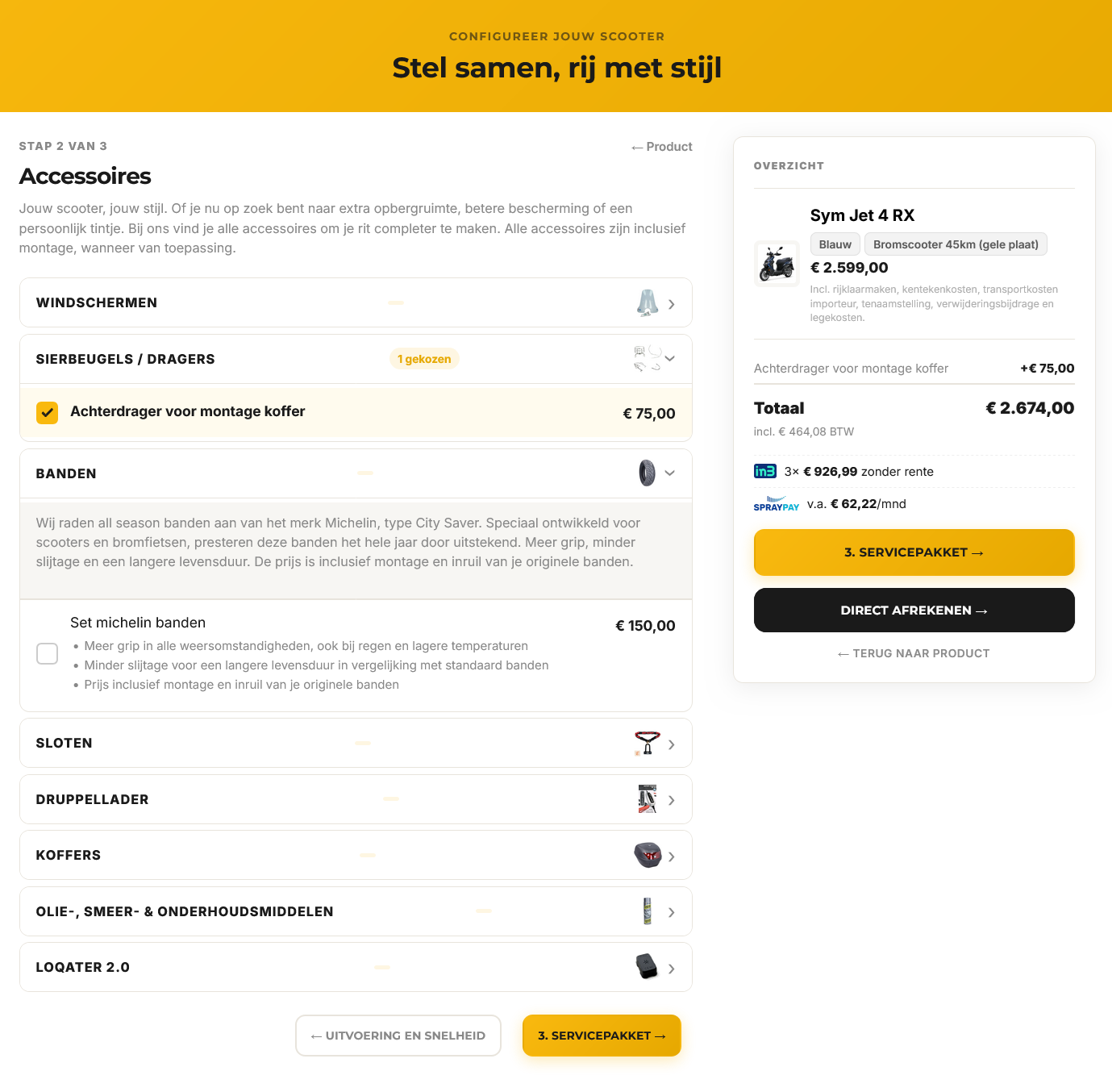
Ten core features that make the configurator so workable for end customers.
Clear layout with clickable tabs like Variant, Accessories and Service plan. Customers always know where they are.
Per step choose between single selection or multiple options. Accordion view possible for long accessory lists.
Total and VAT update instantly with each selection. Optionally also iDEAL in3 instalments and SprayPay monthly amounts.
On desktop customers see a fixed summary with all choices. On mobile it sits pinned at the bottom.
When a variant is selected the product image updates automatically, linked to WooCommerce variations.
The configuration is passed neatly to cart and order confirmation. You and your customer see exactly what was ordered.
Send customers to a preset configuration via a direct link. Handy for ads and email campaigns.
Main color, dark variant, text color and hero texts are freely configurable. No code, with live preview.
Mark specific options as recommended or included by default. Customers see at a glance what you advise and what already comes with the base configuration.
Some groups only appear once an earlier choice is made. Keeps things clear for the customer and avoids overwhelming long lists.
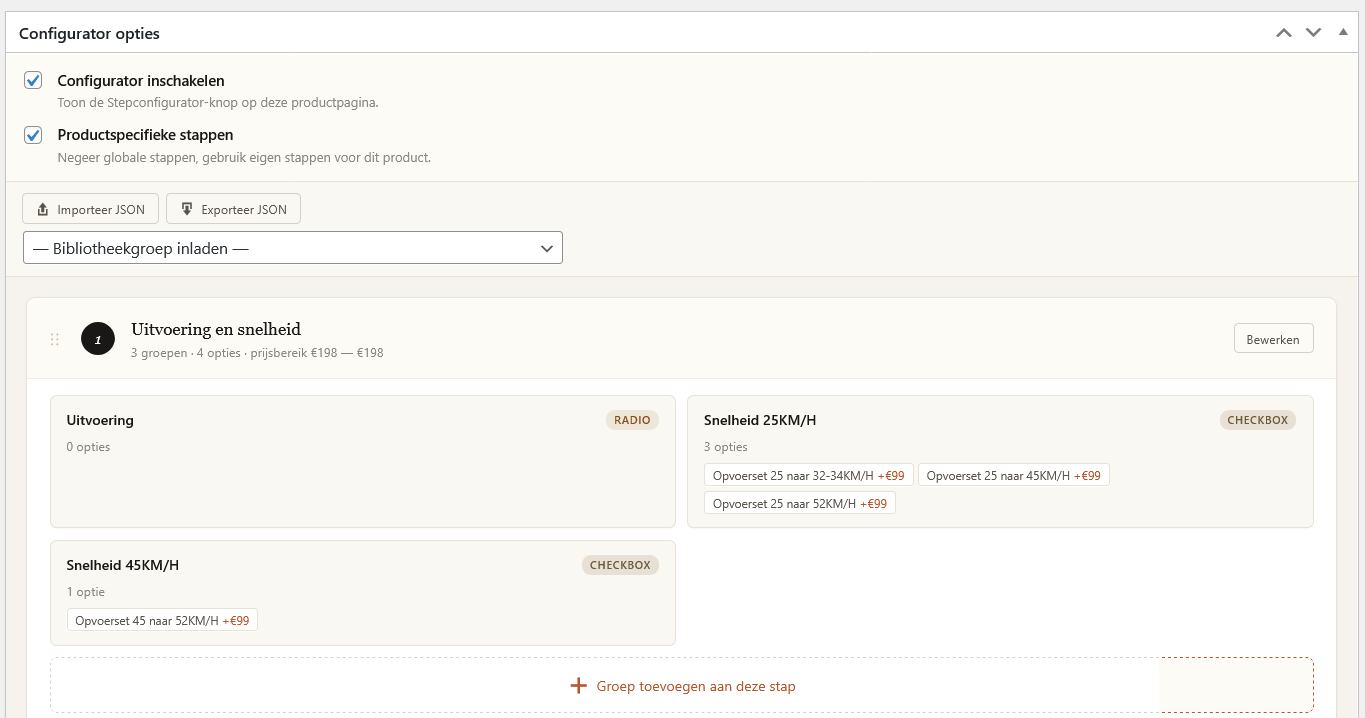
Everything you configure is instantly visible to the customer. Reuse groups, adjust prices, add options: all from one clear admin in Dutch or English.
Reorder by dragging, duplicate options with one click, and collapse or expand steps as needed. Working on your configurator doesn't feel like filling out forms.
The group library may well be the handiest feature: create a group of accessories once and reuse it on all relevant products. That saves hours of data entry with a large range.
Ten ways you keep control of your configurator, without technical knowledge.
Define a default step structure that applies to all products. Set once, applied everywhere.
Per product you can deviate from the default. Add custom steps or modify existing ones without affecting the global setup.
Create reusable option groups, such as a set of accessories, and load them into any product with one click.
Reorder steps, groups and options by dragging. No clicking arrows or editing numbers, just grab and drop where you want.
New option similar to an existing one? Click the copy icon and tweak only the differences. Saves a lot of work on products with variants.
Export steps to JSON and import them on other installations or products. Handy for backups, multiple shops or copying a similar product.
Show or hide option groups based on earlier selections. Build exactly the right flow for your products.
Link a group to a WooCommerce product attribute like color or trim. Pick from an overview of the product's actual attributes, no technical slugs to memorize.
After activation a welcome page appears that guides you through the first five steps: license, configurator page, global steps, library and your first product. With status checks for what's already done.
Optionally set iDEAL in3 percentages and SprayPay monthly factors for what your customers see. Can be turned off entirely if you do not use these providers. Including logo upload.
Eight features that help you sell more, online and in store. Each one can be switched on or off.
Bundle accessories into a package with a fixed price or a discount. The customer sees the separate value struck through and the saving, and cannot order anything twice.
Customers download their configuration as a quote with your logo and details, share it via WhatsApp or print it. All quotes are listed in the admin, without personal data.
When logged in, you create a price card in A5 or A4 straight from the configurator, with price breakdown and a QR code to the product page. Visitors never see this.
Set an hourly rate and enter the assembly time per item. Assembly can be included, optional or removable. You choose the name, such as installation or fitting.
Part of the price without VAT, such as government fees, globally or per product. Optionally as a separate cart line so your invoice is correct.
A distraction-free configurator page without your theme menu and footer, with room for a short trust text. Works with any theme.
Industry-specific features are off by default. For scooter and bicycle dealers a single button fills in the common settings.
All products with the configurator in one list, with filters and quick actions. See at a glance which steps run where.
There are multiple product configurators on the market. Here is why we believe this one works best for webshops that care about quality and support.
Born in a Dutch scooter shop, not in a software office. You notice it in the details: optional display of iDEAL in3 instalments and SprayPay monthly amounts for your customers, Dutch terminology, and support that speaks your language.
The plugin ships with a clear manual and a welcome page that guides you through the first steps right after activation. A few minutes and you're up and running.
A transparent yearly price including everything. No hidden costs, no add-ons that cost 20% extra, no "pro" versions with better features. What you see is what you get.
No ticketing system with 3-day wait times. You send an email, we respond within one business day. Usually faster. In Dutch or English.
Have a requirement that is not standard in the plugin? Custom work is negotiable. Send a short description and we will give an honest answer about what is feasible.